Hjelp og veiledning
FAQ og brukerveiledning for søk, stasjonskort og prisoppdateringer.
FAQ
Ja. Du kan søke med gatenavn og nummer, postnummer eller by. Eksempel: Karl Johans gate 1, Oslo.
Forhåndsvisning: adressesøk
Farger viser status og hvor ferske dataene er. Grønne toner betyr ofte nyere data, mens dempede/advarselsfarger kan bety eldre eller usikker informasjon.
Forhåndsvisning: fargestatus
Åpne stasjon-, kampanje- eller oppdateringsvisningen og bruk delingsknappen på bildet. Du kan dele direkte til ønsket app eller kopiere bilde/lenke før publisering. Drivstoffprisen vises i Open Meta Tag (OG)-bildet som deles.
| Kanal | Forhåndsvisning av delt bilde | Hva som vises |
|---|---|---|
| Deling i sosiale medier | 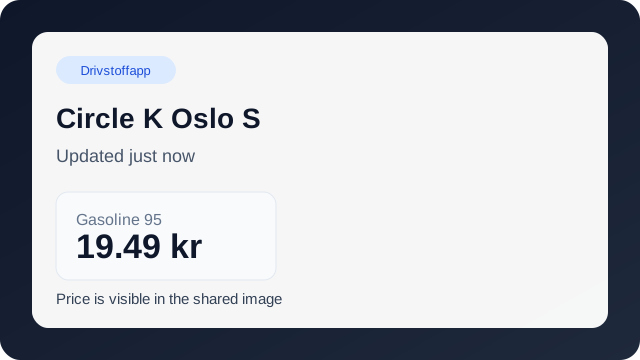 | Drivstoffprisen vises i bildeforhåndsvisningen |
Du finner veiledninger for sosiale medier i området for Distribusjon og markedsføring. Der får du hjelp til innlegg, bildeklargjøring og deling i sosiale kanaler.
Brukerveiledning
Skriv inn full adresse i søkefeltet. Forslag vises mens du skriver, og du kan velge eksakte treff.
Kort- og badgefarger hjelper deg å se tillit, datoferskhet og varsler på stasjonsdata.
Åpne et stasjonskort for å sende prisoppdatering, eller bruk kvittering/chat hvis du trenger veiledning.